
The Complete Guide to SOPs: How to Systemize Your Small Business the Easy Way
You Are the Bottleneck (And That's the Problem)
Are you struggling with any of these?
- Interrupted by questions every half hour
- Worried about what happens if a key employee leaves — or even goes on vacation
- Not sure who does what anymore
- Answering the same questions over and over
- New hires are taking forever to get up to speed
- Mistakes happening because "no one told me"
- Can't step away without things falling apart
- Spending more time fixing problems than growing the business
If you nodded at even one of these, the issue isn't your team. It's that the knowledge is in your head and nowhere else.
That's not delegation — that's dependency. And it doesn't scale.
Every time you answer the same question, walk someone through the same process, give the same training, or fix the same mistake, you're paying a tax on your own time. SOPs eliminate that tax.
A Standard Operating Procedure is simply a step-by-step guide for completing a task. It's not complicated. It's not corporate bureaucracy. It's the difference between "ask the owner" and "check the operations manual."
SOPs, Policies, Processes, Workflows — What's the Difference?
These terms get thrown around interchangeably, but they're not all the same. Here's a simple breakdown:
Terms That Mean (Basically) the Same Thing
SOP / Process / Workflow / Procedure
These all refer to the step-by-step instructions for completing a task. Different industries use different words, but they're describing the same thing: the "how."
- SOP (Standard Operating Procedure) — common in healthcare, manufacturing, and franchises
- Process — common in corporate and tech settings
- Workflow — often used when steps involve multiple people or handoffs
- Procedure — general term, used everywhere
At Operations Mavenue, we use "SOP" and "workflow" interchangeably. A workflow is typically more step-by-step, while a guideline is less rigid — but both live in your Operations Manual.
Terms That Are Different
Policy / Rule / Guideline
These set the standards and expectations — the "what" and "why" — but don't tell you how to do something.
- Policy — a formal rule or standard (e.g., "All customer complaints must be resolved within 24 hours")
- Rule — same as a policy, just less formal language
- Guideline — a softer recommendation, not a strict rule (e.g., "We generally avoid scheduling meetings on Fridays")
A policy without an SOP is just a wish. You've stated the rule, but no one knows how to follow it.
The Bigger Picture: Operations Manual vs. Employee Handbook
Operations Manual
Your Operations Manual is the complete playbook for how your business runs. It includes:
- SOPs and workflows for every department
- Checklists and templates
- Onboarding and training materials
- Company overview, org chart, job descriptions
- Policies and guidelines
- Embedded videos and resources
Think of it as the "how we do things here" guide — for everything operational.
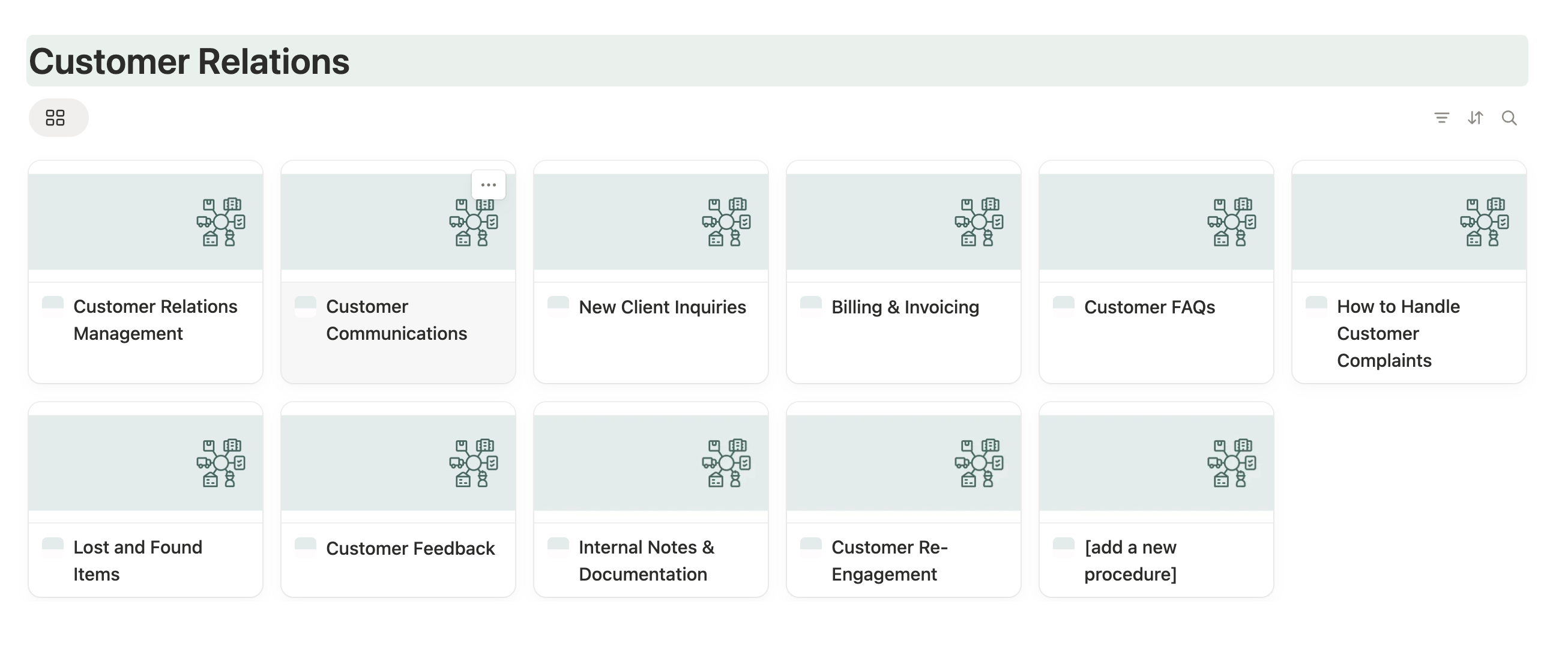
Photo: a clean, well organized section of an operations manual.
Employee Handbook
An Employee Handbook is narrower. It focuses on HR policies and employment-related information:
- Code of conduct
- PTO and leave policies
- Benefits and compensation
- Workplace rules and expectations
- Legal and compliance information
The Employee Handbook answers "what are the rules for working here?" The Operations Manual answers "how do we actually do the work?"
Many businesses include their Employee Handbook as a section within their Operations Manual — that way everything lives in one place.
Quick Reference
| Term | What It Is | Example |
|---|---|---|
| SOP / Process / Workflow / Procedure | Step-by-step instructions (the "how") | "How to onboard a new client" |
| Policy / Rule | A standard or expectation (the "what" and "why") | "All client calls must be logged in the CRM" |
| Guideline | A softer recommendation | "We generally respond to emails within 4 hours" |
| Operations Manual | The complete playbook for running the business | SOPs, policies, training, org chart, and more |
| Employee Handbook | HR policies and employment rules | PTO policy, code of conduct, benefits |
What Happens When You Document Your Processes
1. Consistency stops being luck When everyone follows the same steps, you get the same result. Your reputation no longer depends on who's working that day.
2. Onboarding gets faster New hires stop asking "how do I...?" every five minutes. They check the manual. You get your time back.
3. You can actually step away and focus on growth This is the big one. If you can't take a two-week vacation without things falling apart, you don't own a business — you own a job. SOPs fix that.
4. Mistakes drop Most errors aren't because people are careless. They happen because people don't know the right way to do something. Give them the steps and the errors disappear.
How to Write an SOP That People Will Actually Use
Most SOPs fail because they're either too vague, too long, or buried in a folder no one opens. Here's how to avoid that:
Before You Write
- Pick one process. Don't try to document everything at once. Start with the task that causes the most repeated questions or mistakes.
- Talk to the person who does it. Not the manager — the person who actually performs the task daily. They know the shortcuts, the edge cases, and the steps you've forgotten.
- Decide where it will live. If your SOPs are scattered across Google Docs, Dropbox, and email threads, no one will use them. Pick one place. (More on this below.)
The Writing Process
Step 1: Start with purpose
One sentence explaining what this process accomplishes and why it matters.
Purpose: Ensure every new client has a smooth, consistent first experience that sets the tone for the relationship and gathers everything we need to serve them well.
This gives context. Your team understands why they're following these steps, not just what to do.

Step 2: List what's needed
What you'll need:
- Access to CRM (HubSpot / Notion / etc.)
- New Client Welcome Email template
- Client Intake Form link
- Access to scheduling tool (Cal.com / Calendly)
- Client folder template in Google Drive
This prevents the "wait, where is that?" interruptions mid-process.
Step 3: Write out the steps
Numbered "Step 1 - Action". Simple. Short sentences. Make sure to write for someone who's never done this before.
Steps:
- Add the client to the CRM
- Create a new contact with their name, email, phone, and company
- Set status to "New Client"
- Add the date they signed on
- Send the Welcome Email
- Use the "New Client Welcome Email" template
- Personalize the first line with their name and project type
- Attach the Client Intake Form link
- Send within 24 hours of signing
- Create their client folder
- Duplicate the "Client Folder Template" in Google Drive
- Rename it: [Client Name] - [Project Type]
- Move it to the "Active Clients" folder
- Schedule the kickoff call
- Send your Cal.com link for a 30-minute kickoff call
- Suggest 2-3 time slots if they haven't booked within 48 hours
- Prepare for the kickoff call
- Review their intake form responses
- Add any notes or questions to the client's CRM record
- Have the project scope or proposal open for reference
- After the kickoff call
- Log meeting notes in the CRM
- Send a follow-up email summarizing next steps
- Update client status to "Active"
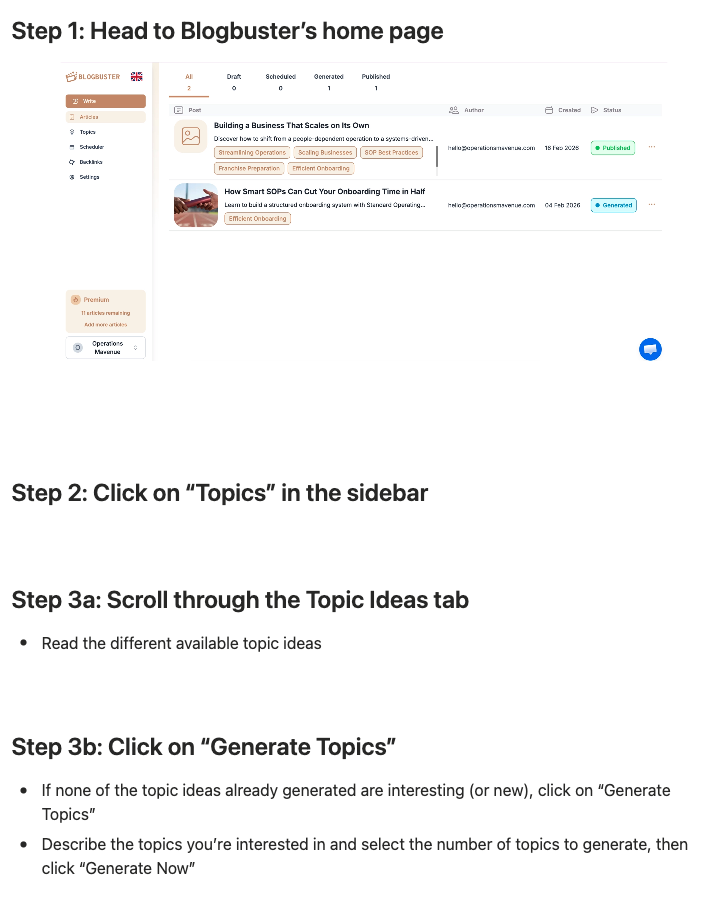
Here's a clean, clear example of what an SOP can look like:
Taking It a Step Further: What's Missing from Your SOP?
A good SOP tells your team what to do. A great SOP gives them everything they need to do it.
Once you've written your steps, go back through and look for gaps. Every time your SOP references something external, ask yourself: Does that thing exist? Is it documented? Can they find it?
Here's what to look for:
Email mentioned? → Do you have a template?
If your SOP says "send the welcome email," your team shouldn't have to write it from scratch every time. Create a template they can copy, paste, and personalize. Link to it directly in the SOP.
Instead of: "Send the client a welcome email" Write: "Send the client a welcome email using the [Welcome Email Template]"
Call or meeting mentioned? → Do you have a script or agenda?
If your SOP includes "schedule a kickoff call," what happens on that call? Don't assume everyone knows. Create a simple call script or meeting agenda so every call covers the same ground.
Add to your SOP: "Follow the [Kickoff Call Agenda] during the meeting"
Step includes checking multiple things? → Create a standardized checklist
If a step says "make sure everything is complete before moving on," that's too vague. What's "everything"? Build a checklist they can run through so nothing gets missed.
Instead of: "Review the file before sending" Write: "Run through the [Pre-Send Checklist] before sending"
Benchmark or target mentioned? → How are you tracking this KPI?
If your SOP says "respond within 24 hours" or "aim for 95% accuracy," where does that get measured? Link to the tracker or dashboard where this KPI lives so your team knows it's being monitored.
Add to your SOP: "Response times are tracked in the [Support Metrics Dashboard]"
Client communication involved? → Do you have a communication guideline?
If your SOP involves emailing, calling, or messaging clients, your team needs to know the rules. What tone should they use? What channel? What should they avoid saying?
Create a simple Client Communication Guideline that covers:
- Preferred tone (friendly but professional, casual, formal, etc.)
- Response time expectations
- Which channel to use for what (email vs. call vs. text)
- Dos and don'ts (e.g., never discuss pricing over text)
Add to your SOP: "Follow the [Client Communication Guidelines] for all client messages"
Tool or software mentioned? → Do you have a tutorial?
If your SOP says "log this in the CRM" or "upload to Google Drive," does your team know how? Don't assume. Link to a quick tutorial or Loom video showing exactly how to do it.
Add to your SOP: "See [How to Add a Contact in HubSpot] if you're unfamiliar with the CRM"
Decision point with multiple outcomes? → Do you have a flowchart or decision tree?
If your SOP says "if X, do this; if Y, do that," it can get confusing fast. For complex decision points, create a simple flowchart or decision tree so your team can follow the logic visually.
Add to your SOP: "Refer to the [Complaint Escalation Flowchart] to determine next steps"
Handoff to another person or team? → Is the handoff process documented?
If your SOP ends with "pass this to the finance team," what does that actually mean? Who do they contact? What information do they include? Document the handoff so nothing falls through the cracks.
Add to your SOP: "Complete the [Handoff to Finance Form] and notify @Sarah in Slack"
The Bottom Line
Your SOP shouldn't exist in isolation. It should link to every resource your team needs to complete the task without asking questions.
Think of it this way: if someone brand new followed this SOP, would they be able to finish the task without help? If the answer is no, something's missing.
The #1 Reason SOPs Fail
It's not bad writing. It's accessibility.
If your SOPs are:
- Buried in a shared drive
- Saved as PDFs, no one can edit
- Scattered across multiple tools
- Include too much fluff or irrelevant details
- Hard to search
...your team will ignore them. They'll ask the person next to them instead. And you're back to square one.
The fix: Treat your SOPs as a living system, not a finished document. They need to be:
- Easy to find (searchable)
- Easy to update (anyone can edit)
- Easy to access (cloud-based, works on any device)
- Easy to understand (anyone reading can take action)
Where to Store Your SOPs
You need a central, searchable, cloud-based home for your documentation. Here's what works:
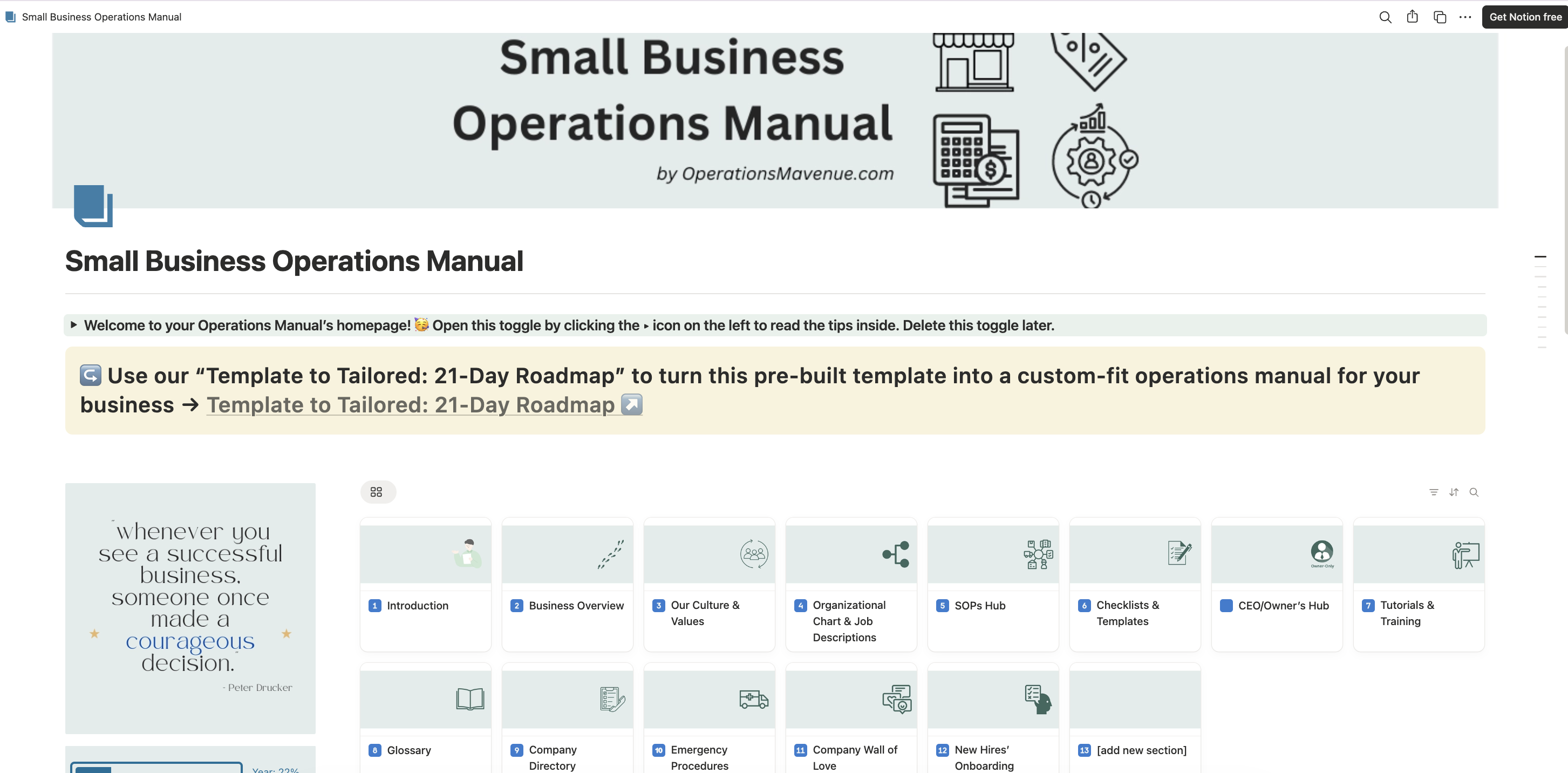
Notion — Our recommendation. It's flexible, searchable, and free for small teams. You can embed videos, checklists, and links directly in your SOPs. It feels like a company wiki (see example below), not a dusty binder.
Google Docs — Better than nothing, but gets messy fast. Hard to organize, easy to lose track of versions.
Trainual / Similar Tools — Built for SOPs, but expensive, and you're locked into their platform. You're paying monthly for software that still requires you to build everything yourself.
The principle: pick one place, make it easy to use, and stick with it.
How to Organize Your SOPs Into an Operations Manual
A single SOP is a recipe. Your Operations Manual is the cookbook.
Organize by function:
- Operations Hub (daily tasks, opening/closing, equipment)
- All Staff Hub (hiring, onboarding, offboarding, policies)
- Finance Hub (invoicing, payroll, expenses)
- Marketing Hub (social media, content, campaigns)
Within each function:
- General SOPs
- Guidelines
- Checklists
- Templates, Forms & Documents
Include more than just SOPs:
- Company overview, mission, values
- Org chart and job descriptions
- Glossary of terms
How to Get Your Team to Actually Use It
Creating the manual is half the battle. Here's how to make it stick:
1. "Check the manual first" When someone asks a question that's already documented, send them the link instead of answering. Every time. This builds the habit.
2. Assign process owners Make specific people responsible for keeping specific sections updated. No owner = no accountability = outdated SOPs.
3. Embed SOPs into workflows Link to relevant SOPs in task assignments, calendar invites, and onboarding checklists. Make it unavoidable.
4. Use it for training and reviews New hire onboarding should be built around the manual. Performance reviews should reference whether SOPs are being followed.
If you want more tips on How to make sure your team uses the SOPs you create, watch our webinar on the topic.
DIY vs. Template vs. Done-for-You
| Option | Best For | Time Required | Cost |
|---|---|---|---|
| DIY | Owners with time and energy to build from scratch | High | Free |
| Template | Owners who want a starting structure to customize | Medium | $ |
| Done-for-You | Busy owners who want it handled for them | Low | $$ |
DIY: Maximum control, but you're starting from a blank page and it takes longer than you think.
Template: Gives you a pre-built structure with 60+ SOPs. You customize it to your business. Good middle ground.
Done-for-You: We get on calls with you, extract everything from your head, and build the entire manual. You just show up and answer questions.
Start This Week: Your 3-Step Plan
Don't try to document your entire business at once. Start here:
- Identify your top 3 most repeated processes. What questions do you answer over and over? What tasks cause the most mistakes?
- Pick one platform. Notion, Google Docs, whatever — just pick one place for everything to live.
- Write one SOP. Just one. Document a single process from start to finish. Test it. Improve it.
Progress beats perfection. One documented process is infinitely better than zero.
Final Thought
Systemizing your business isn't about being corporate or bureaucratic. It's about freedom. Freedom to step away. Freedom to delegate without worry. Freedom to focus on your business's growth without chaos.
Start with one SOP. Then another. Before long, you'll have a business that runs without you — and that's the whole point.